This manual describes ATA BBS 0.1.67 Alpha. It is an early release, out to be tested on real hosts before a beta: expect bugs, and report them on the forum.
ATA BBS runs classic DOS bulletin board systems on ordinary web hosting. A caller opens your board's address in a browser and hears the modem answer. Then comes the real board's own logon prompt: Renegade's, PCBoard's, Maximus's, The Major BBS's, whichever you installed. The board is the original program, byte for byte, running on a small DOS machine inside the caller's browser. Your host stores the board's files and keeps the rules. It answers for you while you sleep.
This manual is the whole of it in one place: what ATA is, how it works, what it needs, how to install and update it, every page and option of the SysOp console, what callers see, how it keeps your board safe, where everything lives, what to do when something goes wrong, and a chapter for each of the eighteen boards it runs. Installing door games has a guide of its own, the door guide.
ATA BBS is free software under the MIT license. One build, no registered edition, no keys, no banner.
01What ATA is, and what it is not
A bulletin board in 1993 was a DOS program on a PC with a modem. A caller dialled the number. The modem answered, and the board took the caller's name and password and gave them its menus: messages, files, chat with the operator, door games. The operator sat at the same PC and could watch a caller or break in to chat, and when the line was quiet, run the board's own configuration programs.
ATA BBS is that PC and that modem, rebuilt for the web, with everything that made a board a board kept:
- The board is the original program. ATA never changes a package's programs. Renegade 1.40 is Renegade 1.40, PCBoard 15.3 is PCBoard 15.3. ATA only does what a SysOp would have done in DOS: fix a drive letter, make a directory, set a switch in the package's own configuration.
- The board's own logon is the only login. There is no web account for callers. A caller types their handle and password at the board's prompt, exactly as over a modem, and a new caller applies through the board's own new-user questions.
- Several callers at once, on separate lines. Most packages run up to six lines out of the box, each caller on a node of their own, all sharing one set of messages, files and user records.
- The operator's console is still there. You get the board's own waiting-for-caller screen, its local logon, its user editor and configuration programs, a real DOS prompt, and a seat at any caller's machine to answer a page and chat.
- Doors work the way they did. A door game runs from the board's own menu with the board's own drop file. Legend of the Red Dragon has been set up and played on every board that can run doors; the door guide walks through it.
What it is not: it is not a hosted service, it is not an emulator you install on your computer, and it is not a modern web forum dressed up as a board. It does not bundle any door game. It runs on hosting you already have, and the board is yours.
Supported boards only. ATA runs the eighteen packages it has profiles for, each one installed and proven with real calls. A profile is ATA's knowledge of one exact package version: where its user file is, how its records are laid out, which of its files a caller may change, how it hands over a caller and how it pages its operator. That knowledge is what makes the board safe to put on the internet, so ATA does not run packages it has no profile for. Another package becomes a profile in a later release.
02How it works
The machine is the caller's browser. When a caller opens your board, their browser boots a small FreeDOS machine right on the page (the v86 emulator, with its BIOS and a 1.4 MB boot floppy, about 3.5 MB in all, kept in the browser's cache after the first call). The board's files reach that machine over a network drive, D:, which your host serves file by file. The board program runs on the caller's own processor and draws its screens into a terminal on the page, exactly as a caller's terminal drew them over a modem. Every caller runs their own copy of the machine.
The host stores bytes and keeps the rules. Nothing DOS ever runs on your host. PHP serves the board's files to the machines, takes their writes back, holds the record locks that keep two callers from writing the same record at once, hands out line numbers, and keeps the log. That is why ATA runs on shared hosting: it needs PHP, a database file and, ideally, a cron tick. Nothing else.
The jail. Because the board runs in a stranger's browser, the host cannot trust what that browser sends. Every write a caller's machine makes passes through ATA's rules for that package first: which files a caller may change, which only the operator may change, which nobody may change during a call. Passwords never travel to the browser at all; the host checks a typed password itself and hands the board a stand-in. Section 11 says what this means in practice.
One board, one folder. Each install of ATA holds exactly one board. The board's live files sit in data/doorstore/dos/board inside your ATA folder, and that folder is the machine's D: drive. Want two boards? Install ATA twice, in two folders.
The connect ceremony. A caller's page shows ATA's banner, "dials" your board's number, rings, prints CONNECT and hands the line to the board. If the board is closed, full, or the host is having trouble, the caller hears it in modem terms: a notice and NO CARRIER, BUSY, or NO ANSWER.
Lines. A board answers as many callers at once as the line cap you set allows, each on their own node with their own drop files and work directories, all sharing the message base, the file areas and the user records. A caller past the cap hears BUSY.
The day. The board has a time zone, set at install and changeable on the Settings page. Every machine's DOS clock keeps that time, so the board's own idea of "today", its time limits and its daily events agree with yours.
Duties. A board wants housekeeping: a nightly batch for door maintenance, a weekly one for message base packing. Since nothing DOS runs on the host, a duty runs on a machine too: the first caller of the day on a quiet board runs it while their line rings, or you run it yourself from the console. A snapshot is taken first, so a run that is cut off restores instead of corrupting. Section 10 has the details.
Hanging up. A caller who logs off by the board's own goodbye ends the call cleanly. A caller who closes the tab simply dropped carrier: the host notices within a minute or two and frees the line and any locks. The board's files are left as the board last wrote them.
03What you need
On the host:
- PHP 8.1 or newer, with the SQLite driver (PDO SQLite), mbstring, zlib, json and hash. Almost every shared host has these. The setup page checks each one and says plainly what is missing.
- A folder PHP can write to, for ATA and its data.
- Outgoing HTTPS from PHP (curl, or
allow_url_fopenwith OpenSSL), so the setup can fetch ATA from www.atabbs.com. A host that blocks outgoing connections still works: the setup then carries the files through your browser, or lets you download them and pick them by hand. - A web server that serves static files as they are, including
.wasm, and that honours the deny rule ATA puts indata/. Apache with.htaccesssupport is the common case and works as is. On nginx, deny web access todata/yourself (the console tells you if the host serves it). - Cron, recommended. One line, every minute or every five. Without it the same housekeeping rides on caller traffic.
- HTTPS for your site, recommended. Not required, but the console login travels in the clear without it.
For callers: a current desktop browser (Chrome, Edge, Firefox, Safari) and a keyboard. Phones can look; a board wants eighty columns and real keys.
Disk: ATA itself is a few megabytes; a board is two to ten megabytes when installed; uploads grow it, up to the allowance you set (section 7.3).
04Installing
ATA installs one way: a small setup file you put on your host, which fetches ATA and the one board you pick from www.atabbs.com.
4.1Put the setup on your host
- Make a new, empty folder on your web host for the board, for example
public_html/bbs/. One folder holds one board. The setup refuses a folder that already holds ATA's files. - Download the installer from www.atabbs.com (
ata-bbs-latest.zip, one link that always gets the newest). Unzip it on your computer. Inside is one file,ata-setup.php. - Upload
ata-setup.phpinto the new folder, under that name. Any FTP mode works for this one file, and your host's file manager works too.
4.2Run the setup
Open
https://your-site/bbs/ata-setup.phpin your browser. Use one browser, at one address, the whole way through: the browser that presses Install owns the install.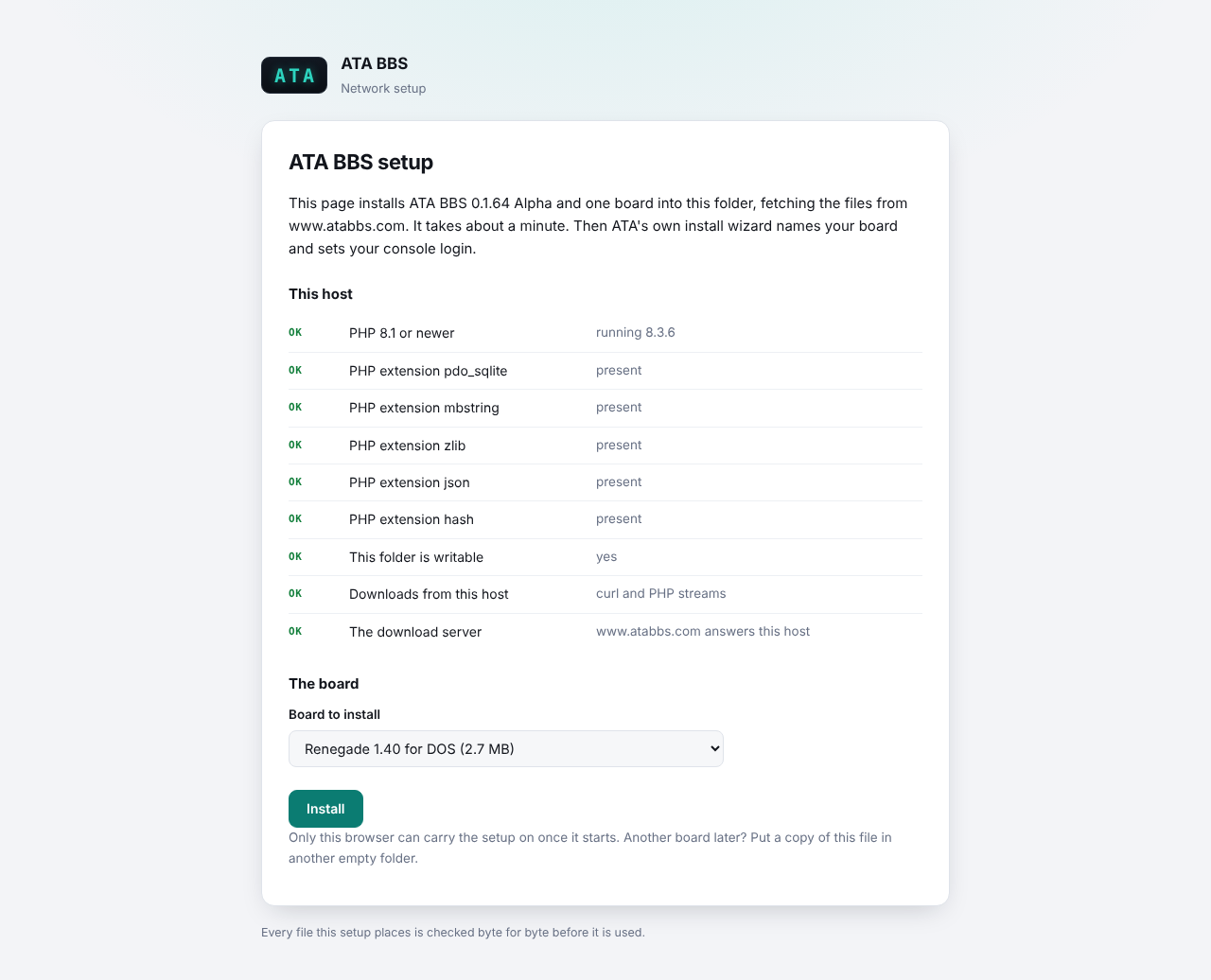
The setup page: the host check and the board picker
The page checks your host first: the PHP version and extensions, whether the folder is writable, how PHP can download, and whether www.atabbs.com answers your host. Every row should say OK.
Pick a board from the list. Every board carries its version number; the two Citadel family boards sit together under one heading. The size beside each is what the setup will download.
Press Install. The setup downloads ATA and the board, checks every byte of every file against the checksums the setup file carries, unpacks, and puts the files in place. On a typical host this takes about a minute. Then ATA's own install wizard opens.
If the host cannot reach www.atabbs.com, the page says so and your browser carries the files instead: it fetches them and hands them to the host in pieces, and the host checks every byte exactly as before. If the browser cannot fetch them either, the page lists the files to download yourself and pick from your computer.
If the page says the setup is running in another browser, the first browser to press Install owns the run and the wizard after it. If that was you and the window is gone, the page offers to take it over once it has sat idle for fifteen minutes.
4.3The install wizard
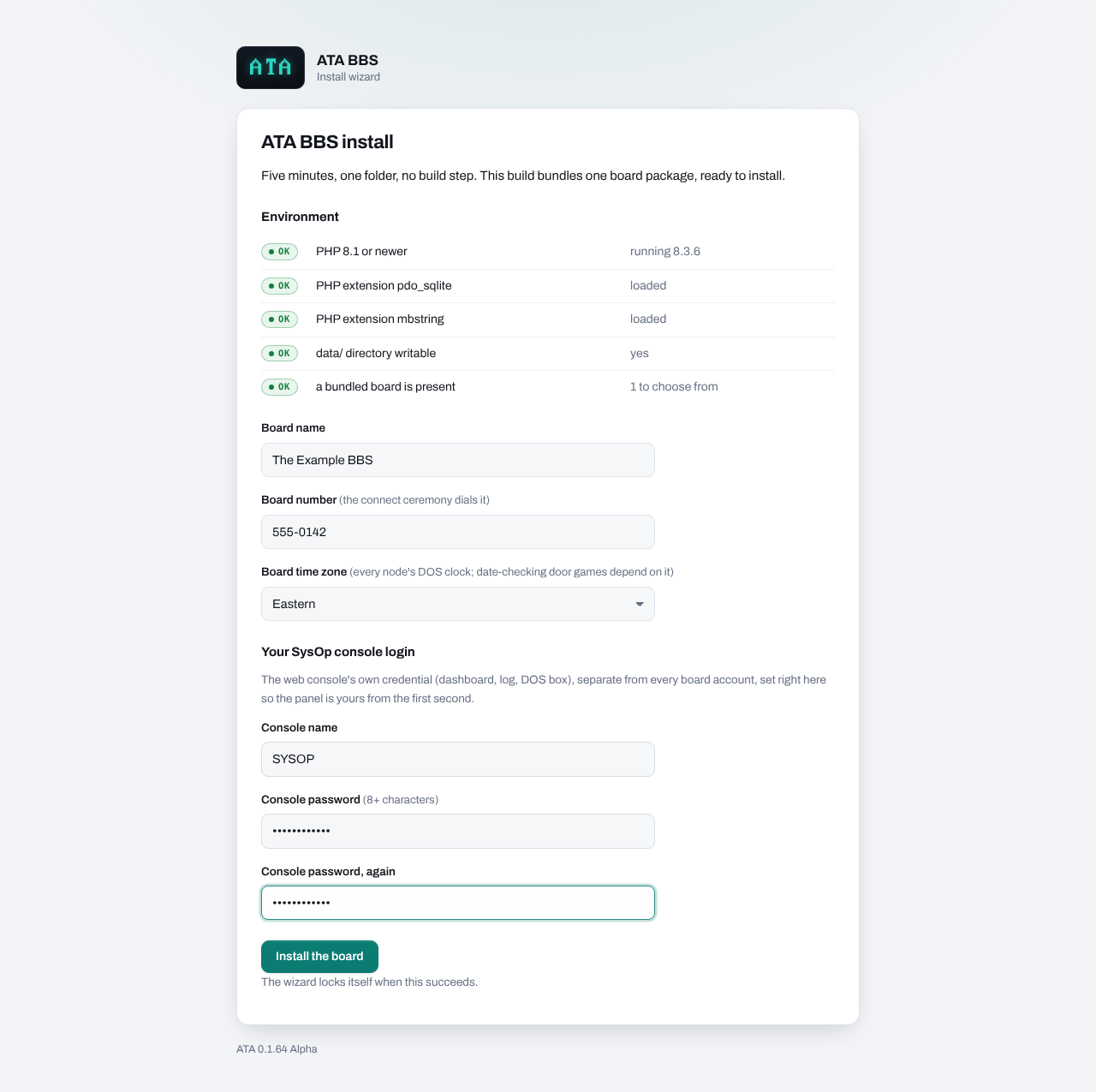
- Board name. What the console and the caller's page call your board. Up to 60 characters.
- Board number. The number the connect ceremony "dials". Anything that looks like a phone number works: digits, spaces, dashes, parentheses.
- Board time zone. The time every node's DOS clock keeps. Door games and the board's own daily events check the date, so pick the zone you think of as the board's.
- Your console login. A console name and a password of at least eight characters, twice. This is the web console's own login, separate from every account on the board. Nobody else can claim the console: the wizard sets it, and there is no other way in.
- Press Install the board.
4.4The finish page
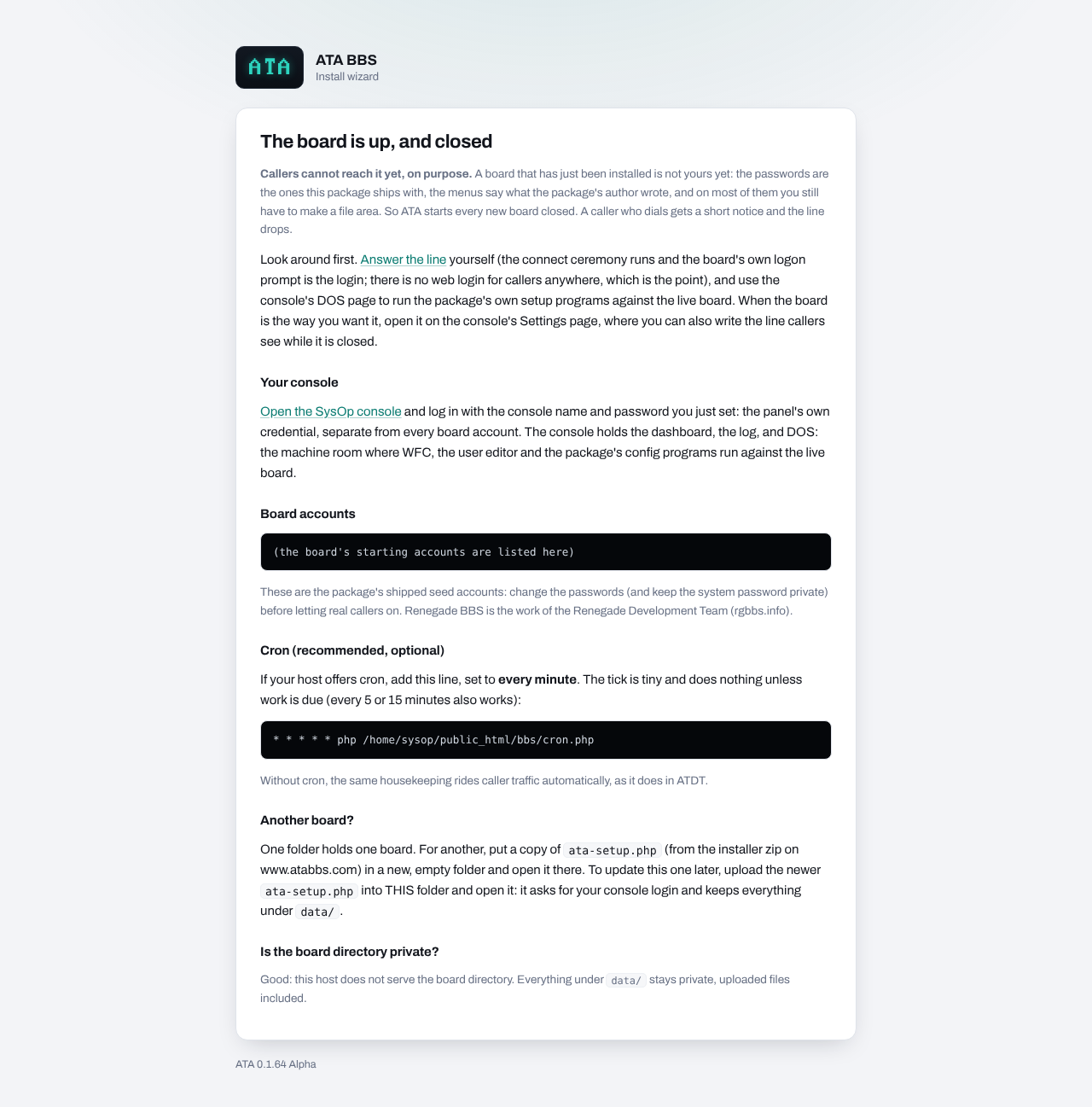
The finish page is worth reading once and keeping:
- The board is up, and closed. A new board does not take callers until you open it (section 5). A caller who dials hears your notice and the line drops.
- Board accounts. The board's starting accounts: the SysOp account the package came with (or the one ATA made for it), and how a new caller applies. Copy these now. The passwords are the package's own starting ones, so change them before you open the board.
- Cron. The exact line for your host's scheduler, with your folder's path filled in. Set it to every minute (every five also works).
- Is the board directory private? The page checks, through your web server, whether files in
data/can be fetched from the web. On Apache it should say the host does not serve them. If it warns, deny web access todata/in your host's configuration before you open the board: callers can upload files, and on such a host anyone could fetch them, your board's database and logs with them.
When the wizard has installed the board it deletes ata-setup.php and the setup's working folder .ata-setup/ by itself.
4.5Cron
ATA's housekeeping is tiny: it frees lines whose callers vanished, arms the nightly and weekly duties at board midnight, and trims the log. Without cron the same work rides on caller traffic and console visits, which is fine for most boards. With cron it happens on time even when nobody calls, and the dashboard's CR lamp goes green.
In cPanel, DirectAdmin or Plesk, add a cron job with the line from the finish page:
* * * * * php /home/you/public_html/bbs/cron.phpSome hosts want the full path to PHP there, such as /usr/local/bin/php; the host's cron page names it. One run takes a few dozen milliseconds.
4.6Another board
One folder holds one board. For a second board, put a fresh copy of ata-setup.php in a new, empty folder and open it there. Each install has its own console login, its own database and its own callers.
05Your first hour with a new board
A board straight from the package is not yours yet: the passwords are the package's, the menus say what the package's author wrote, and on most packages you still have to decide on your file areas. So ATA starts every board closed. This is the order that works:
- Log in to the console (
/bbs/admin/) with the console name and password you just set. - Call the board yourself. It is closed, so you will hear the closed notice: that is the caller's view of a closed board. You can look at everything from the console instead.
- Open the DOS page. Boot the package's local logon or its waiting-for-caller screen and log on as the starting SysOp account from the finish page. Section 7.6 explains the page, and your board's chapter in section 14 says which button does what.
- Change the passwords. The SysOp account's password, and any second "system password" your package asks a SysOp for. Your board's chapter says where.
- Make the board yours. The board's name inside the package, the welcome screens, the security levels, the message and file areas. Each package does this its own way, from its own configuration program on the DOS page; your board's chapter names the road.
- Set the line cap and the upload allowance on the Settings page, if the defaults (six lines, 100 MB of uploads) do not suit you.
- Open the board on the Settings page: tick "The board is open to callers" and save.
- Call it. Open your board's address in a browser. Watch the ceremony, then log on.
06Updating
An update is the same small setup file, laid over the install you have.
- Download the newest installer from www.atabbs.com and take
ata-setup.phpout of it. - Upload it into the folder where ATA is installed, replacing nothing else.
- Open
https://your-site/bbs/ata-setup.php. It sees ATA already there and asks for your console name and password. Five wrong tries in fifteen minutes and it stops listening. - It downloads the new release, checks every byte, and replaces ATA's program files and your board's install source.
What an update keeps: everything under data/. That is the live board itself, every caller's account, every message, every uploaded file, the log, the snapshots, and every setting on the console.
What an update replaces: ATA's own code (the console, the caller's page, the machine files, the profiles), and the board's install source folder, which is only the clean copy a fresh install is made from.
The same setup file on the same release repairs damaged program files. A setup file older than the ATA in place refuses to run, so an update never goes backwards.
Updating from a release before 0.1.66: every browser logged in to the console is asked to log in once more, and on every board but Fido 12 (which runs no doors) D:\DOORS becomes a door folder (section 7.3), which the new version makes, empty, the first time it runs. A LORD installed at D:\LORD by an earlier door guide keeps working where it is.
A board package changing version (a newer Renegade, say) is not part of an update. ATA keeps the package version it installed; moving a live board to a new package version is planned for a later release.
07The SysOp console
The console is your web panel, at admin/ inside your ATA folder (for example https://your-site/bbs/admin/). It holds six pages: Dashboard, Settings, Events, Watch, DOS and Host check.
7.1Logging in, and the faceplate
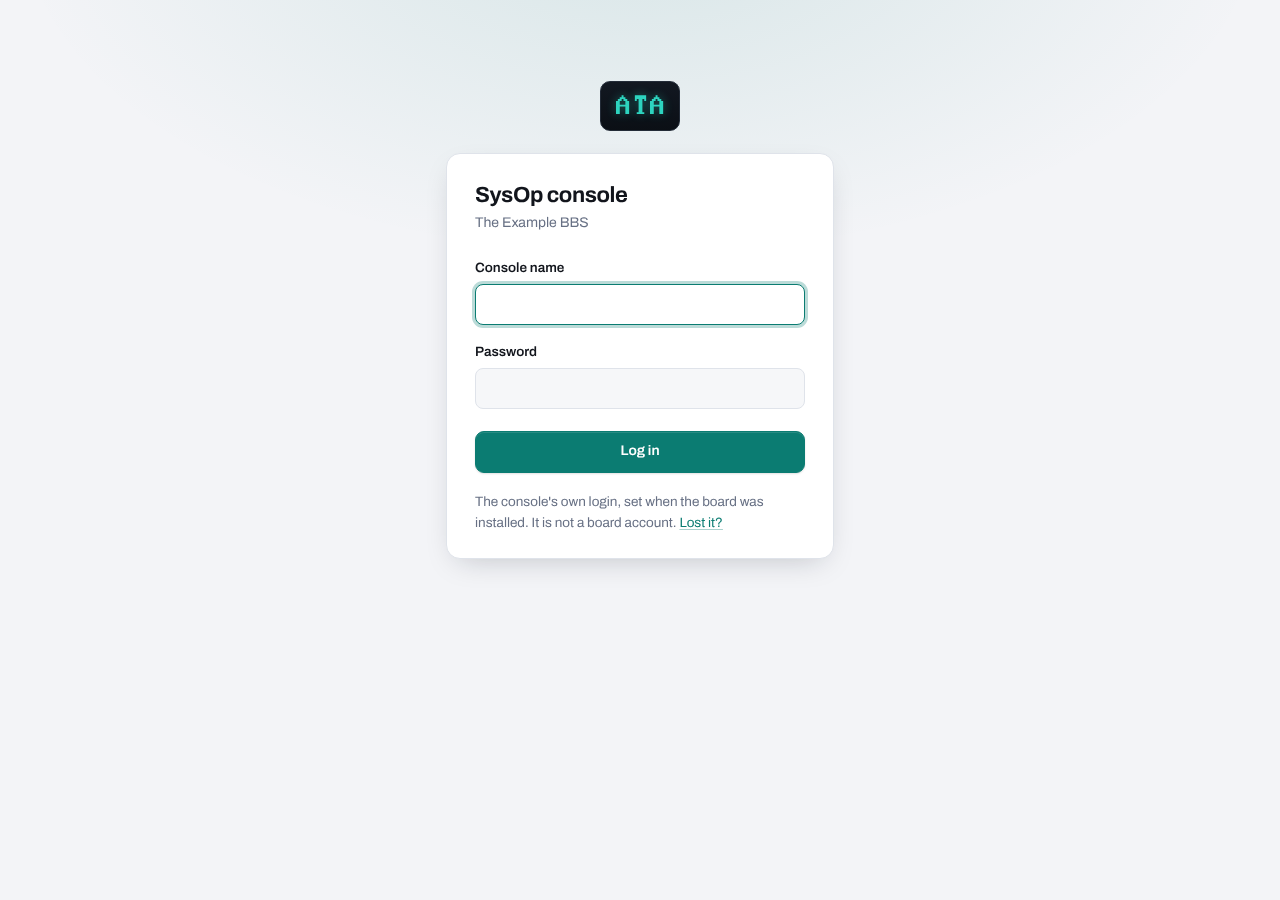
Log in with the console name and password you set in the install wizard. The console name is not case sensitive. After a run of wrong passwords from one address the page says "Too many tries. Wait a few minutes." and refuses for a while.
The console login is the panel's own. It is not an account on your board, and no board account can log in here. Change it on the Settings page (section 7.3, Console login).
Lost it? The login page's "Lost it?" link resets it without mail, by the one proof only you have: you can put files on your hosting account.
- Press Give me a code. The page shows a code such as
7F3K-9QWX-2MZDand the folder on your host it means: the folder that holdsindex.phpandinstall.php. Copy the code right away: the page shows it only this once, and a later visit offers a new code instead.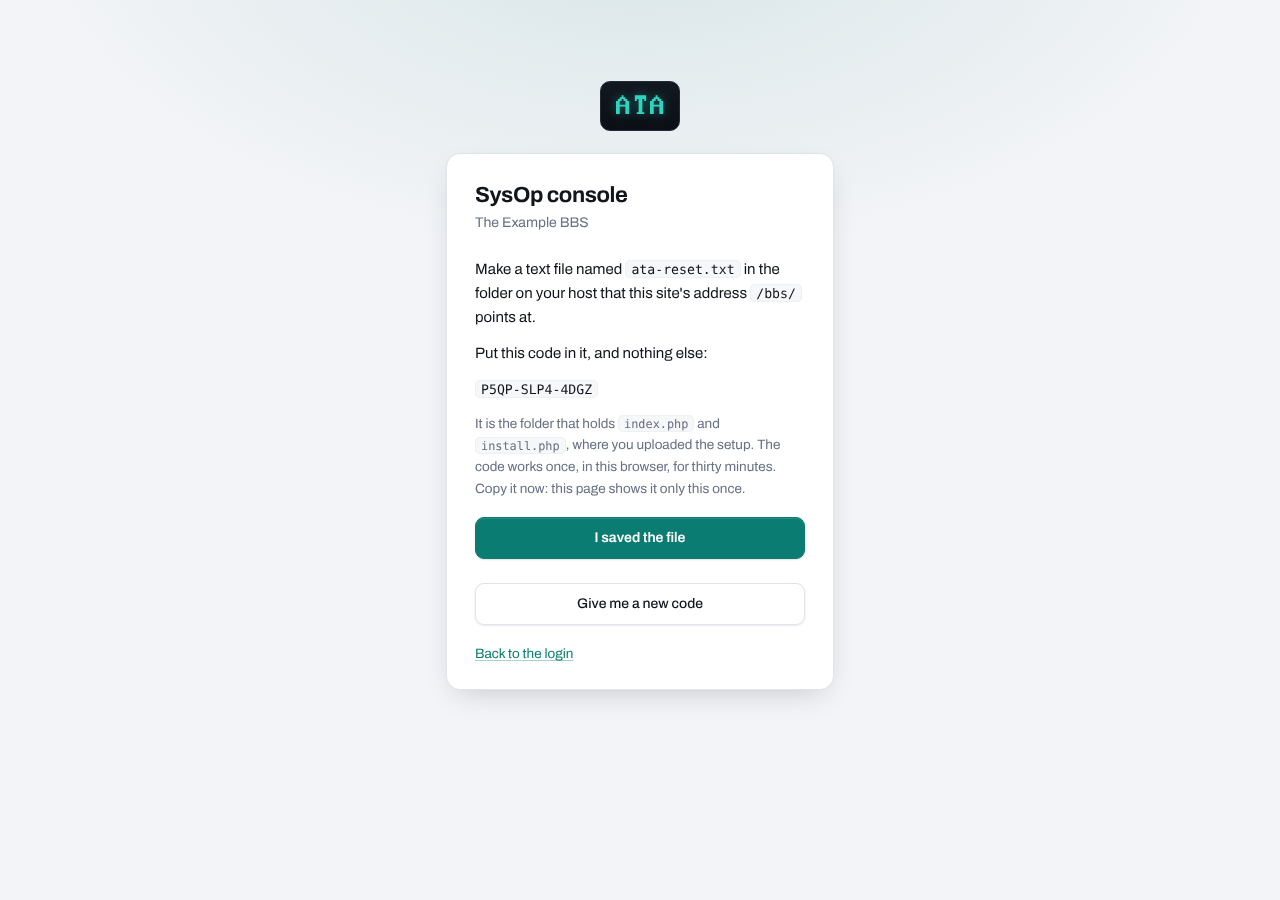
The reset page's code - With your host's file manager or FTP, make a text file named
ata-reset.txtin that folder holding the code and nothing else (upper or lower case, spaces and dashes do not matter). - Press I saved the file. The page reads it back, and when it holds this browser's code, asks for the console name and a new password (at least 8 characters, twice).
- Press Set the login. ATA deletes the file, logs you in, and logs out every other browser still logged in with the old login; a DOS page open in one of them stops working with it.
The code works once, in the browser it was given to, for thirty minutes, and the new login must be set within fifteen minutes of the file being found (even if that runs past the thirty). When the time has run out the page says "That took too long. Start again." A file left on the host from an earlier reset is no use to anyone: it holds a code no other browser was given. Every step is a security line in the log. A board that somehow has no console login at all is sent down the same road.
Every console page wears the same faceplate across the top:
- The board's name, which also takes you to the Dashboard.
- The six pages: Dashboard, Settings, Events, Watch, DOS and Host check. On a narrow screen the row scrolls sideways.
- Four lamps, like the front of a modem:
- AA (auto answer): green when the board is open and answering, amber when you have closed it, red when callers are refused for a reason in the board's own setup (the dashboard spells out which).
- CD (carrier detect): lit while callers are on the line, with the number of callers beside it.
- PG (page): blinks red while a caller is paging you. Click into Watch to answer.
- CR (cron): green when your host's cron is running ATA's housekeeping, amber when housekeeping is riding on caller traffic instead.
- Your console name, the day and night switch (the moon or sun icon; your choice is remembered by this browser only, and the console otherwise follows your system's light or dark setting), and sign out.
While the board is closed, every console page carries an amber notice saying so, with a link to open it. While a caller is paging you, every console page shows a red banner, "Node N is paging you", with a link straight to the seat that answers it.
The footer names the ATA version you are running.
7.2Dashboard
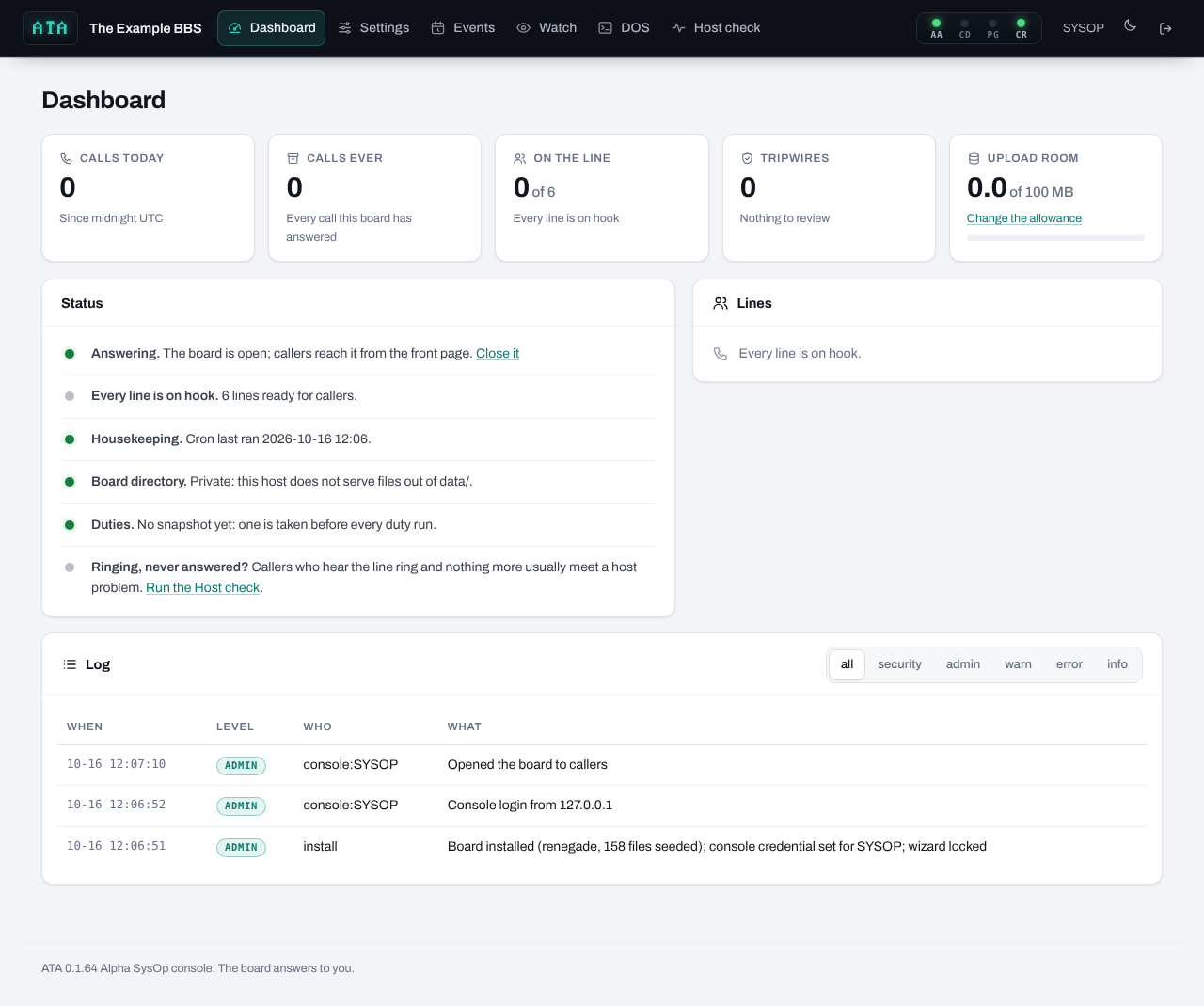
The dashboard is the board at a glance.
The tiles across the top:
- Calls today. Calls answered since midnight UTC.
- Calls ever. Every call this board has answered.
- On the line. Callers connected now, out of the line cap. When someone is on, the tile links to Watch.
- Tripwires. Security events nobody has reviewed yet: a caller's machine that tried to write somewhere the rules forbid. Zero is normal. When it is not zero, the tile links to the log filtered to security.
- Upload room. How much of your upload allowance the board has used, with a meter that turns amber at 80 percent and red when it is spent. With no allowance set, the tile shows the board's size instead.
Status spells out the board's state in words, one line each:
- Answering, Closed to callers, or Callers are refused. The same three states as the AA lamp. "Refused" means the board is open but something in the package's own setup would expose callers' private details, so ATA turns callers away until it is fixed; the line says exactly what.
- The lines. How many callers are on, or how many lines are ready.
- Housekeeping. When cron last ran, or that housekeeping is riding on caller traffic, with the cron line to add.
- Board directory. Whether your host serves files out of
data/to the web. ATA checks this live, through your web server. It must say private. - Duties. The latest snapshot, any duty waiting for a quiet machine, and any duty halted after failed runs.
- Ringing, never answered? A pointer to the Host check, for the day a caller tells you the line rings and nothing answers.
Lines lists every open line: the node number, who is on (or "not logged on yet" while a caller is still at the logon prompt), their class (a caller, a SysOp seat, your own DOS page), their address, when the line answered and when it was last heard from.
The log shows the latest 200 events, newest first. The buttons filter by level:
- security: a write the rules refused, a password check that failed in a suspicious way, a token mismatch. Worth reading every time.
- admin: what you did on the console (opened the board, changed a setting, ran a duty).
- warn: something that needs a look but did not stop the board (a file the board tried to create in a folder that does not exist, say).
- error: something failed.
- info: ordinary traffic, such as a line answered, a caller logged on, a line closed.
Two alerts can appear above the status card: a duty halted after aborted runs (fix its batch on the Events page, then reset it), and leftover installer files the host would not let the setup delete.
The dashboard works on a phone too: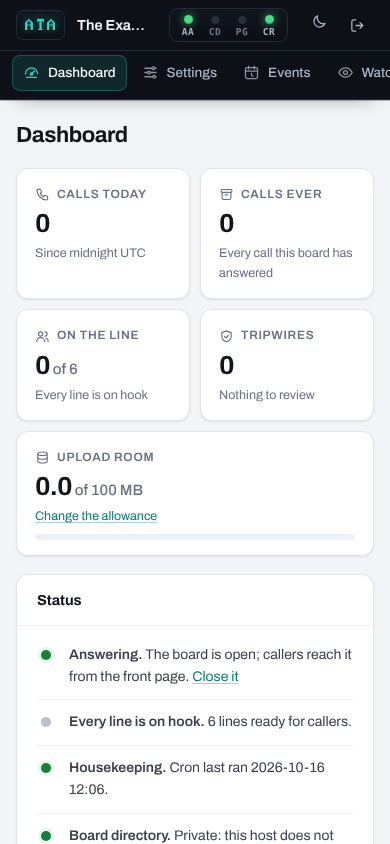
7.3Settings
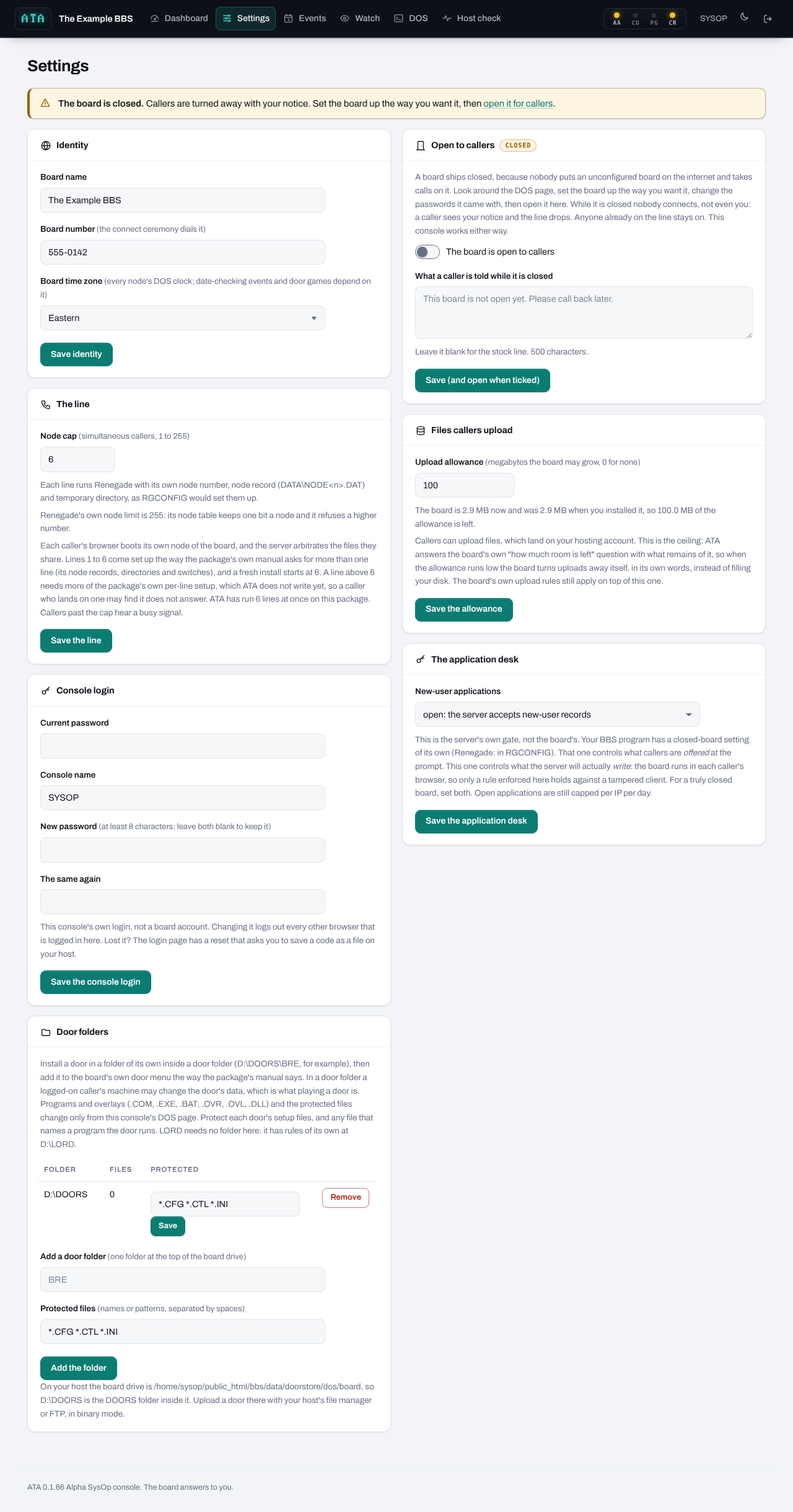
Every card saves on its own button. Each save is written to the log.
Identity
- Board name. 1 to 60 characters. Shown in the console and on the caller's page. The name inside the package itself (what the board calls itself on its own screens) is set in the package's own configuration.
- Board number. 3 to 20 characters of digits, spaces, dashes and parentheses. The number the connect ceremony dials.
- Board time zone. Every node's DOS clock. A change reaches each machine at its next boot, so callers already on keep the old clock until they call again.
The line
- Node cap. How many callers may be on at once. The range runs from 1 to your package's own maximum (or 100 when the package names none). A single-line package (Citadel-86e, Asgard-86) shows one line and cannot be raised.
The hints under the field say what your package needs for more lines: on most boards lines 1 to 6 come set up the way the package's manual asks (their node records, directories and switches), and a fresh install starts at six. A few packages need nothing per line, and a few have ATA set each line up when it is first dialled; the hint says which. On a package where lines past six need setup ATA does not write yet, the page says so: a caller who lands on such a line may find it does not answer. The page also says how many lines ATA has actually run at once on this package. Callers past the cap hear BUSY.
Open to callers
This is the board's on and off switch.
- The board is open to callers. A board ships closed. While it is closed nobody connects, you included: a caller hears your notice and the line drops. Anyone already on stays on. The console works either way.
- What a caller is told while it is closed. Up to 500 characters. Blank uses the stock line, "This board is not open yet. Please call back later."
- Hang up N callers on the line now. Appears only when someone is on. Ends every call at once, the way pulling the phone cord would.
The chip beside the card's title says closed, refused or open, the same as the AA lamp.
Files callers upload
- Upload allowance. How many megabytes the board may grow past the size it was installed at; 0 means no allowance. The default is 100 MB.
Callers can upload files, and those land on your hosting account. The allowance is the ceiling: every board asks the drive how much room is left before it accepts an upload, and ATA answers with what remains of your allowance. When it runs low, the board itself turns uploads away in its own words, instead of filling your disk. The card shows how big the board is now, how big it was at install, and how much of the allowance is left. The board's own upload rules (levels, ratios, file areas) still apply on top.
The application desk
- New-user applications: open or closed.
This is ATA's own gate, separate from your package's own "closed board" setting. The package's setting decides what callers are offered at the prompt. This one decides what the host will actually write: when it is closed the host refuses every new-user record whatever a caller's browser sends, which is the only rule that holds against a tampered browser. For a truly closed board, set both. Even when it is open, each address may make only three applications a day, so one visitor cannot flood your user file.
Console login
- Current password, then the console name, a new password and the same again.
Leave both new password fields blank to change only the name. Changing the login logs out every other browser that is logged in to this console, and a DOS page open in one of them stops working with it; this browser stays in, DOS page included. A wrong current password counts against the same throttle as the login page.
Door folders
A door saves its game in its own folder, and a caller's machine may change only what ATA's rules for the board allow. A door folder is a folder at the top of the board drive where a logged-on caller's machine may change a door's data, and nothing else: programs and overlays (.COM, .EXE, .BAT, .OVR, .OVL, .DLL) and the folder's protected files change only from your console's DOS page or a SysOp seat, and nobody reads the folder before logon.
D:\DOORS is a door folder from the start, and the install makes it, empty. Put each door in its own folder inside it (D:\DOORS\LORD, D:\DOORS\BRE). LORD in a door folder's own LORD folder keeps the few rules ATA measured for it: its program list and node files stay yours, and the small batch it writes for an in-game module is allowed for the caller's own line (the door guide, chapter 7). The card lists each door folder with the number of files in it and its protected files, *.CFG *.CTL *.INI to begin with:
- Protected (Save). Names or patterns, separated by spaces:
BRE.DAT,*.LST, or a path inside the folder such asBRE\IGMS.DAT. A name without a folder counts in every subfolder. Protect a door's setup files, and any file that names a program the door runs: a member who could rewrite one would choose what the next player's machine, or your own console, runs. - Remove. The folder stops being a door folder. Its files stay where they are; callers can still read them but nothing in it can be saved from a caller's machine.
- Add a door folder. One folder name at the top of the board drive (
BREmakesD:\BREone), with its protected files. The board's own folder, ATA's folders (ATA,GHOST,WORLDS), another package's folder name andD:\LORD(which has rules of its own: a LORD already installed there keeps working) cannot be added; the page says why. Up to 32 folders, each with up to 24 protected names.
The card ends with the board drive's full path on your host. The door guide, chapter 7, walks a door through it. Fido 12 runs no doors, so the card only says so there.
Teleconference and module worlds (The Major BBS only)
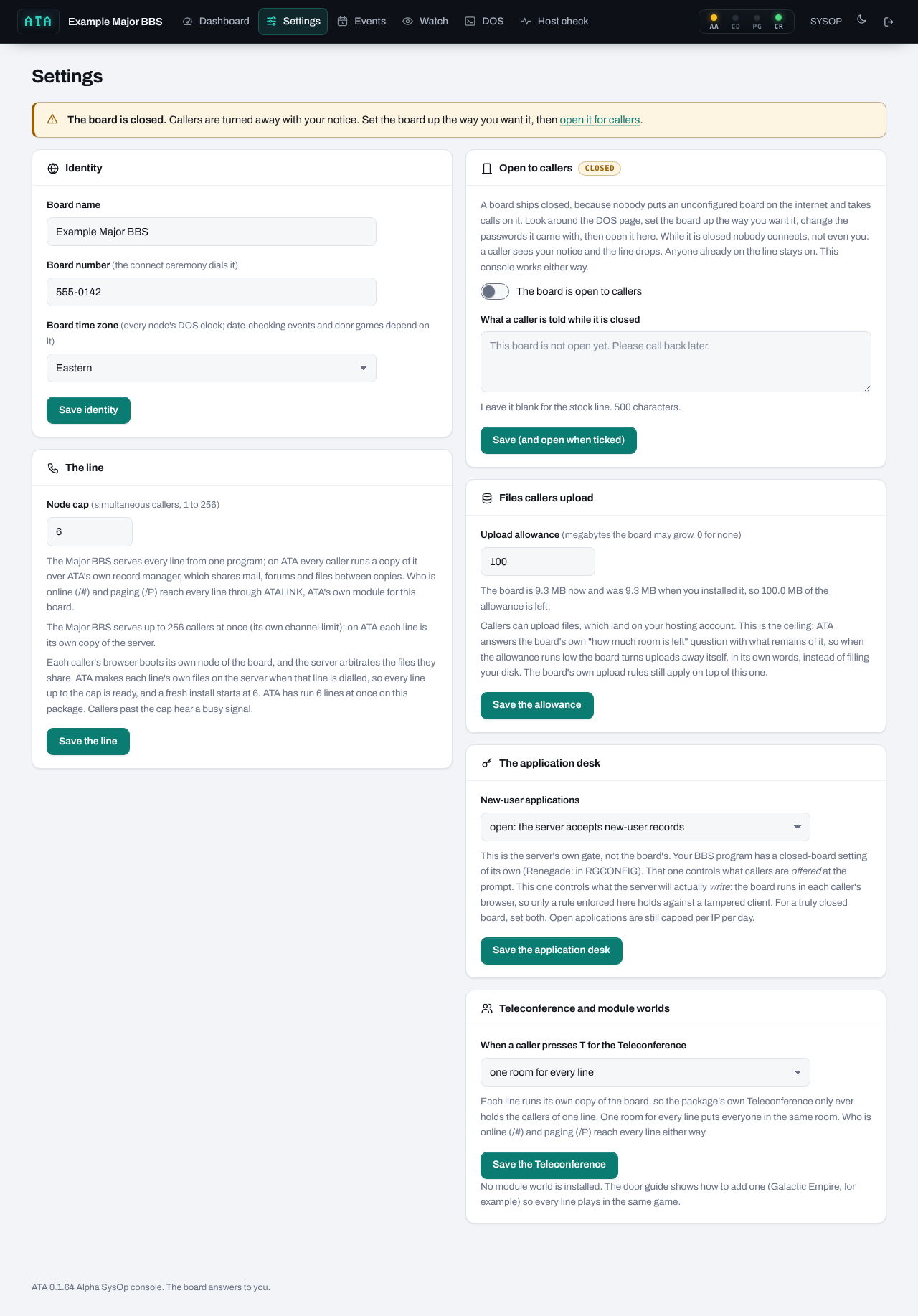
This card appears only on The Major BBS, where every line runs its own copy of the board's server.
- When a caller presses T for the Teleconference: one room for every line, or a room for each line. With one room for every line (the default), everyone in the Teleconference is in the same room, whatever line they called on, through ATALINK, ATA's own module for this board. With a room for each line, the package's own Teleconference runs as it did on a single-line board. Who is online (
/#) and paging (/P) reach every line either way. The change applies to the next caller who presses T. - Module worlds. When you have installed a game module such as Galactic Empire or Legends of Kyrandia by the door guide, it is listed here with its door name and version. Reset starts that world afresh from its files at the next player's entry. A world keeps the files it was made with, so a game in progress never changes under its players: after you change a module's files, reset it once nobody is playing. Reset ends the old world for good, and the button is not offered while someone is in it.
If ATALINK is not in place yet (on a board updated from an older release), the card says so; it is put in place by itself at the next call that finds nobody else on the board.
7.4Events
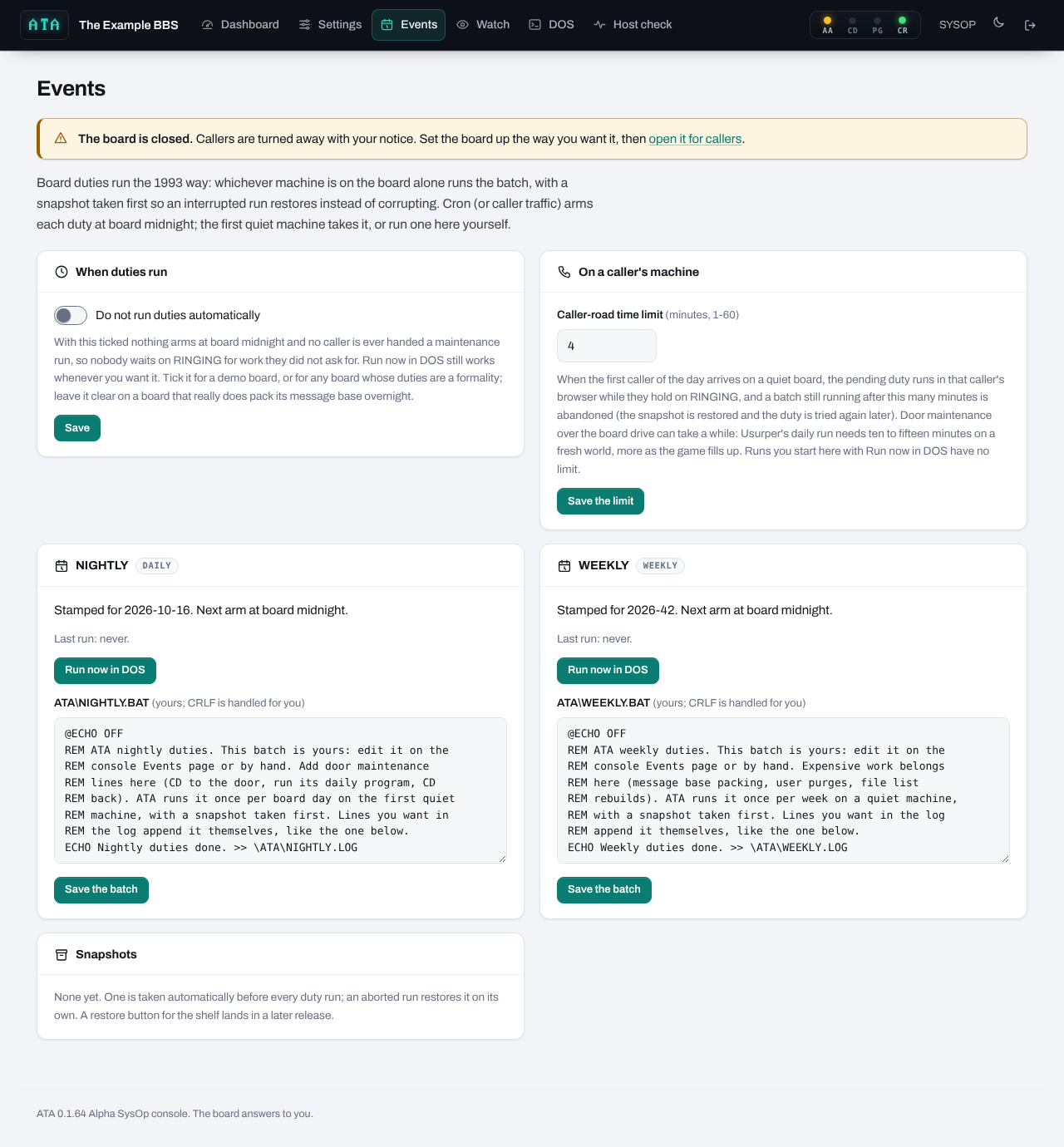
Board duties run the 1993 way: whichever machine is on the board alone runs the batch, with a snapshot taken first. Section 10 explains duties in full; this is what the page offers.
- When duties run: "Do not run duties automatically". Ticked, nothing arms at board midnight and no caller is ever handed a maintenance run; Run now still works whenever you want it. Leave it clear on a board that really does maintenance overnight.
- On a caller's machine: Caller-road time limit. 1 to 60 minutes, default 4. When the first caller of the day arrives on a quiet board, a waiting duty runs in that caller's browser while their line rings, and a batch still running after this many minutes is abandoned: the snapshot goes back and the duty is tried again later. Door maintenance can be slow over the board drive; raise this if yours is. A duty you run yourself from the console has no limit.
- NIGHTLY (daily) and WEEKLY (weekly). One card each:
- Its state: when it was last stamped and when it next arms, or pending (waiting for a quiet board), or halted (after two aborted runs in a row).
- Last run and its errorlevel, and how many attempts were aborted since.
- Run now in DOS, which opens the DOS page in duty mode (section 7.6).
- Reset, shown only when the duty is halted: forgives the failed attempts so automatic runs resume. Fix the batch first.
- The batch itself,
ATA\NIGHTLY.BATorATA\WEEKLY.BAT, in an editor. It is yours. Line endings are handled for you; the limit is 16 KB. - The last log,
ATA\NIGHTLY.LOGorATA\WEEKLY.LOG, when there is one.
- Snapshots. The latest snapshots, with when, which, and how many files each holds. One is taken before every duty run and restored automatically when a run is aborted. A restore button for the shelf comes in a later release; until then a snapshot is plain files under
data/snapshots/.
While any caller is on, the page warns that Run now will be refused until the lines are quiet.
7.5Watch
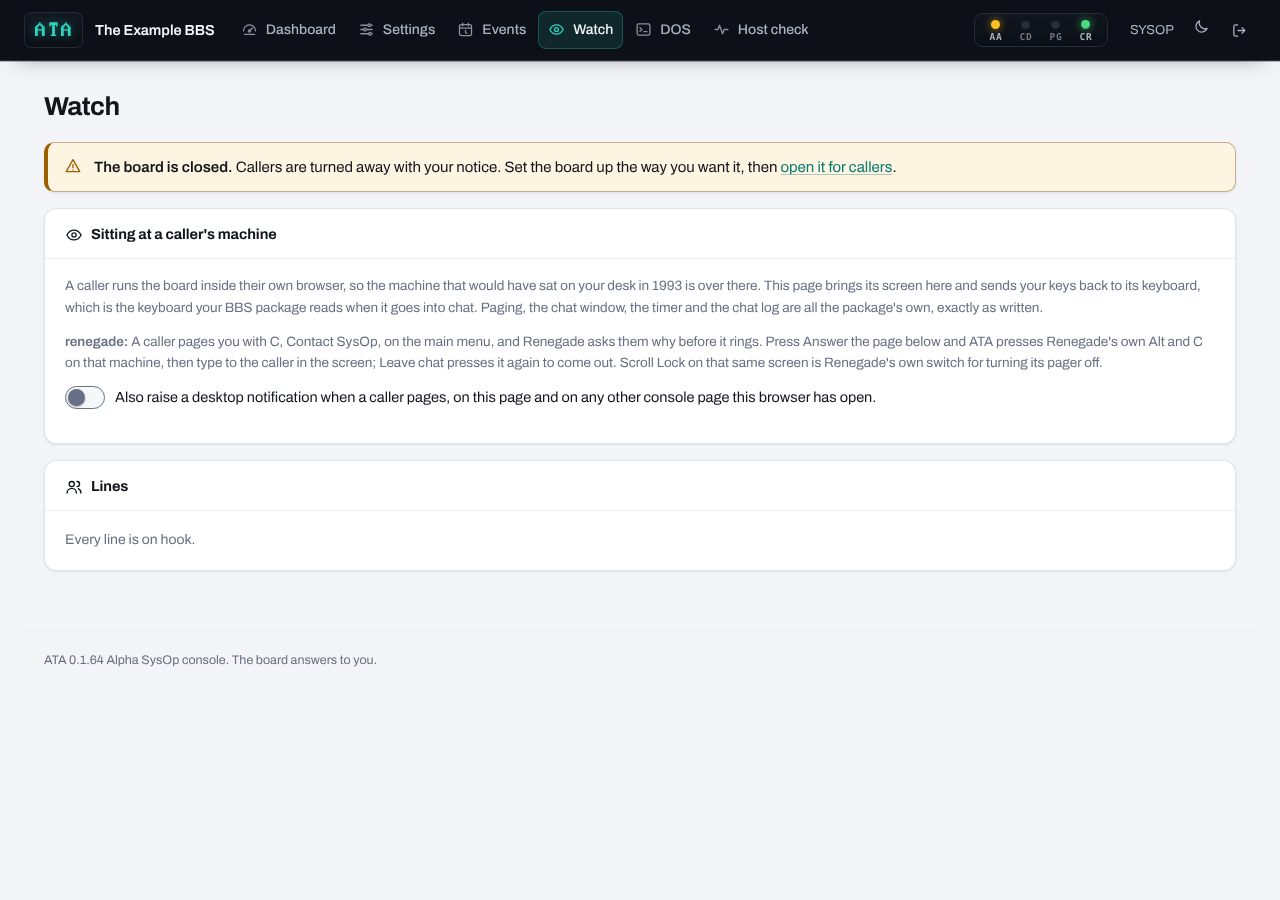
A caller runs the board inside their own browser, so the PC that would have sat on your desk in 1993 is over there. The Watch page brings that caller's screen to you and sends your keys back to their machine's keyboard, the keyboard your package reads when it goes into chat. Paging, the chat window, the chat timer and the chat log are all the package's own.
The top card explains this, then says in one paragraph how your package pages you and which keys answer it (your board's chapter in section 14 says the same).
- Also raise a desktop notification when a caller pages. Tick it and the browser asks your permission; when you allow it, a test notification appears at once so you know it works. From then on a page raises a desktop notification on this page and on any other console page this browser has open. If the browser blocks notifications for the site, the page says how to turn them back on.
Lines lists every caller on the line: node, who (or "not logged on yet"), a red paging chip on a caller who is paging you, their address, when the line answered, and a Watch button.
When a caller pages, a red banner appears above the list, "Node N is paging you (handle). Paged at time.", with an Answer it link that opens their seat with typing already on.
The seat (after you press Watch on a line):
- The caller's screen, live, in colour, as they see it.
- Answer the page presses your package's own key for answering a page (only shown on packages that have one).
- Break in and type presses the package's key for starting a chat the caller did not ask for, then turns typing on: click the screen and type, and your keys land on the caller's machine. Press it again to stop typing; the key is pressed only on the way in, because on many packages the chat key is a toggle.
- Leave chat presses the package's own key for ending a chat.
- Show the board's own screen swaps the view to the machine's local screen, what the SysOp at the board would have seen (status lines, the chat split screen on some packages). Press again to go back to the caller's view.
- Stop watching returns to the line list.
The status line under the buttons reports what the seat is doing, and how long the round trips take (console and caller), so a slow chat can be described in numbers.
Watching costs a call nothing until you open a seat; an unwatched call never sends its screen anywhere. The caller is not told they are being watched: on 1993 boards they never were.
7.6DOS
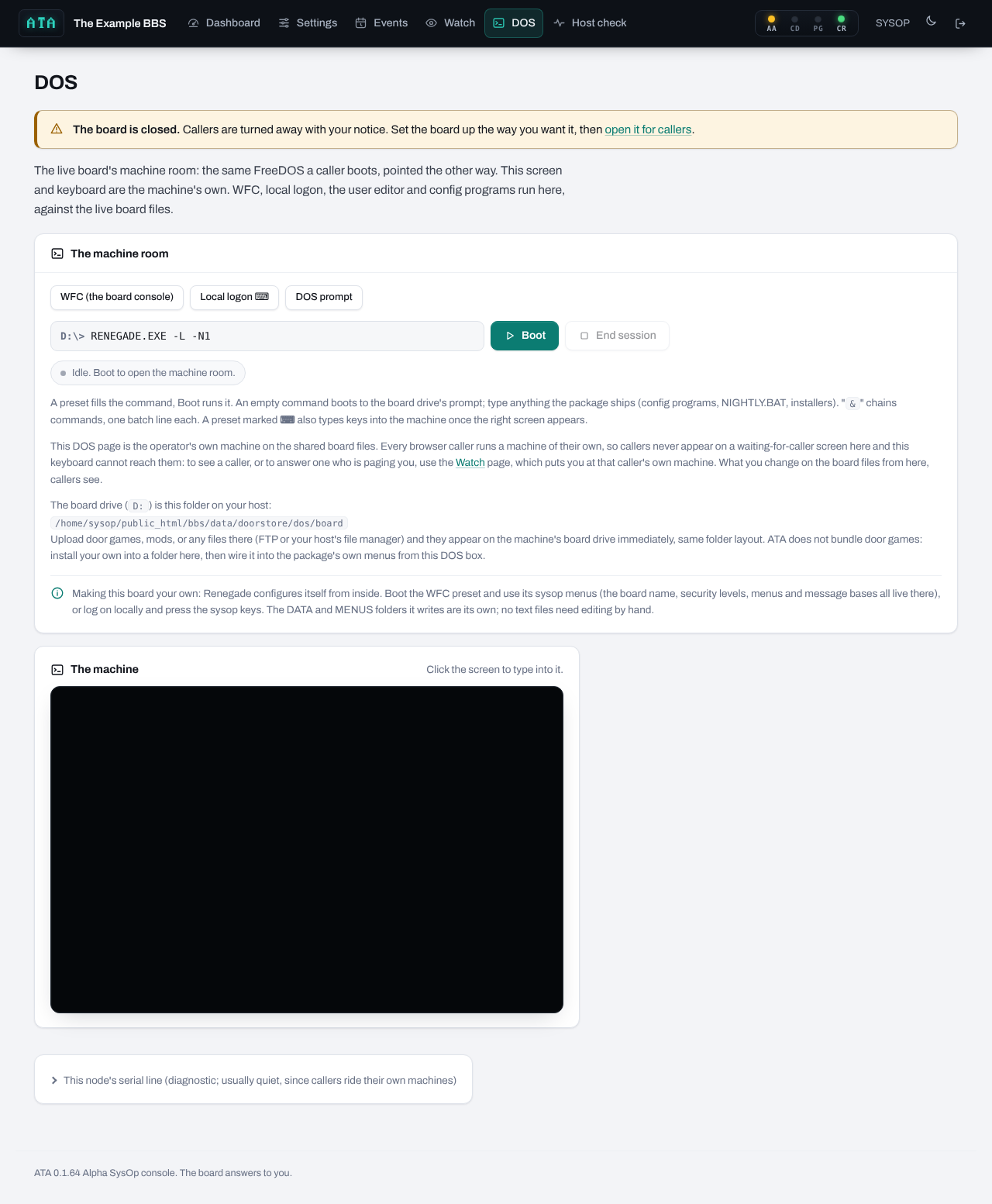
The DOS page is your machine room: the same FreeDOS machine a caller boots, pointed the other way. Its screen and keyboard are the machine's own, and it works on the live board files. The board's waiting-for-caller screen, the local logon, the user editor and the package's configuration programs all run here.
The presets are one-click commands your package's chapter describes: typically the waiting-for-caller screen, a local logon, the configuration program, the user editor, and a plain DOS prompt. A preset marked with a keyboard symbol also types keys into the machine once the right screen appears (Renegade's local logon presses SPACE and Y at its waiting screen for you); a note under the presets says which keys it will type.
The command line (D:\> and a box): a preset fills it, or type your own. An empty command boots to the board drive's prompt. & chains commands, one batch line each (CD \DOORS\LORD & LORDCFG). Up to 120 characters.
- Boot starts the machine with that command.
- End session stops the machine and closes your seat. Always leave a package's configuration program through its own exit first: many save only on a clean exit.
The status pill says what the machine is doing: idle, booting, running, ended.
The machine pane is the screen. Click it to type into it. Function keys, Alt and Ctrl combinations reach the machine as on a real keyboard.
This node's serial line (folded away) shows what a caller on your console's node would see. It is usually quiet, because callers ride their own machines.
The board drive. The page prints where D: is on your host, for example /home/you/public_html/bbs/data/doorstore/dos/board. Upload door games, utilities or any files there with FTP or your host's file manager, and they appear on the machine's D: drive at once, same folder layout. Use capital letters for DOS file names.
Your package's note at the bottom says how to make this board your own: which configuration program edits what, and where the caller-facing screens live.
Things to know:
- Your DOS seat counts as node 0 and never takes a caller's line. It lasts up to eight hours.
- Callers never appear on a waiting-for-caller screen here, because each caller runs their own machine. To see or answer a caller, use Watch.
- Whatever you change on the board files from here, callers see. Configuration work is kindest while the lines are quiet; the page warns you when callers are on.
- One DOS session at a time: a second console tab is told another session is open, and Boot is refused while a duty is running.
- On The Major BBS, the board is one program serving every line, so its utilities expect the board to be down: Boot is refused while any caller is on.
Duty mode. "Run now in DOS" on the Events page opens this page with a duty card at the top. Run NIGHTLY now takes a snapshot, boots the machine and runs ATA\NIGHTLY.BAT, its output going to ATA\NIGHTLY.LOG, on screen. The duty counts as done when the batch writes its completion file at the end; ending the session before that counts as an abort, and the snapshot goes back. A duty run needs the board to itself and is refused while a caller is on.
7.7Host check
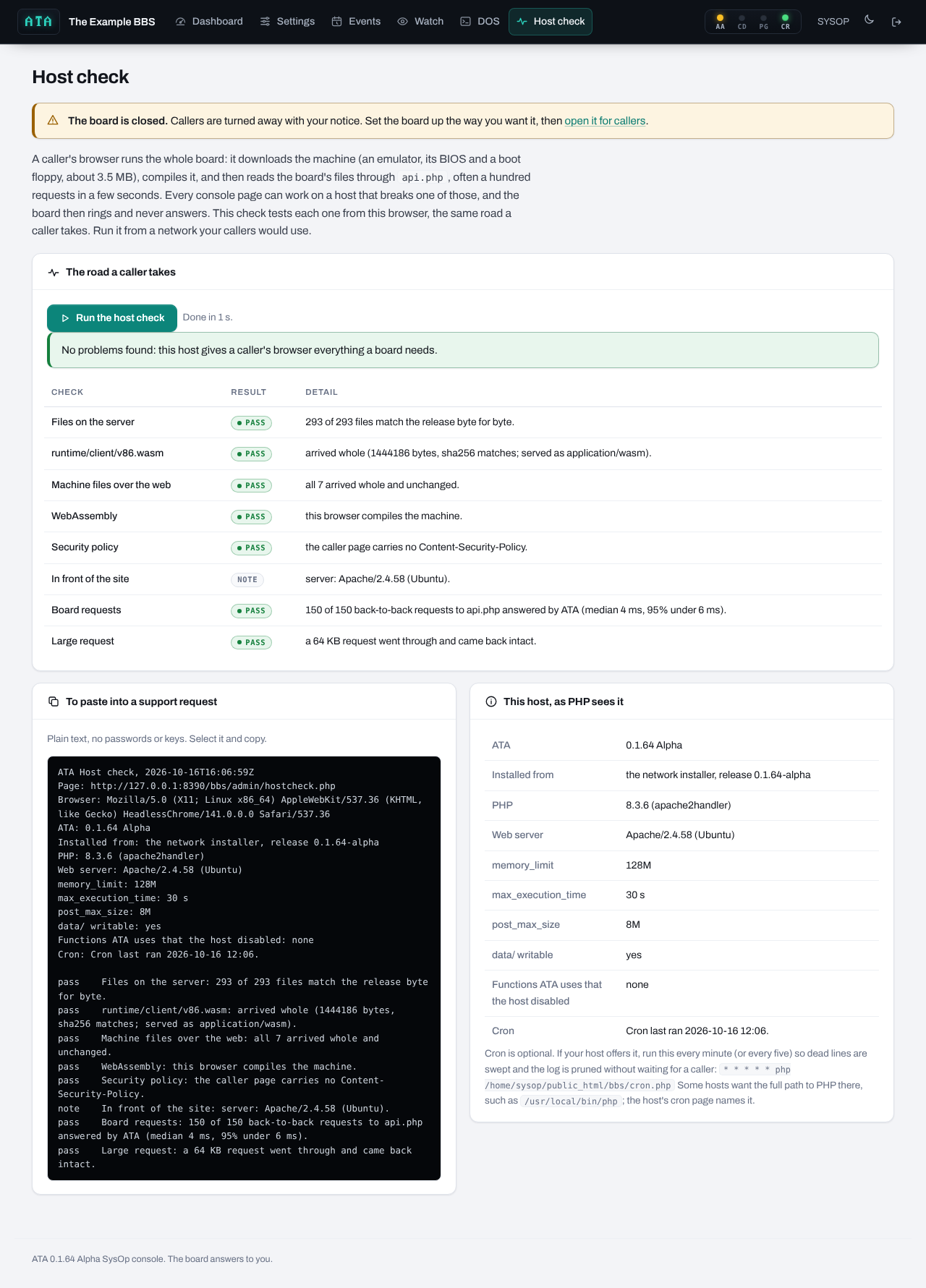
A caller's browser downloads the machine (about 3.5 MB), compiles it, and then reads the board's files through api.php, often a hundred requests in a few seconds. Every console page can work on a host that breaks one of those, and the board then rings and never answers. The Host check tests each one from your browser, the same road a caller takes. Run it from a network your callers would use.
Press Run the host check. It takes about half a minute. Each row passes, fails, or carries a note:
- Files on the server. Every ATA file compared byte for byte with the release it came from. A failure names the damaged files, usually from an FTP upload in text mode; run the setup file again to repair them.
- runtime/client/v86.wasm. The emulator's CPU arrived whole and with a type a browser will compile.
- Machine files over the web. The BIOS, the boot floppy and the scripts arrived whole and unchanged through your web server.
- WebAssembly. This browser compiles the machine.
- Security policy. No Content-Security-Policy header blocks the machine from compiling.
- In front of the site. What sits in front of PHP (the server software, any proxy or CDN). A note, not a verdict.
- Board requests. 150 back-to-back requests to
api.php, all answered by ATA, with the median and slow times. A host with a request limiter in front of PHP fails here, and that is the classic cause of "it rings and never answers". - Large request. A 64 KB request goes through and comes back intact.
To paste into a support request holds the whole report as plain text, with no passwords or keys in it. This host, as PHP sees it lists the ATA version, where it was installed from, the PHP version, the web server, the memory and time limits, whether data/ is writable, any functions the host disabled, and the cron state, with the cron line.
08What callers see
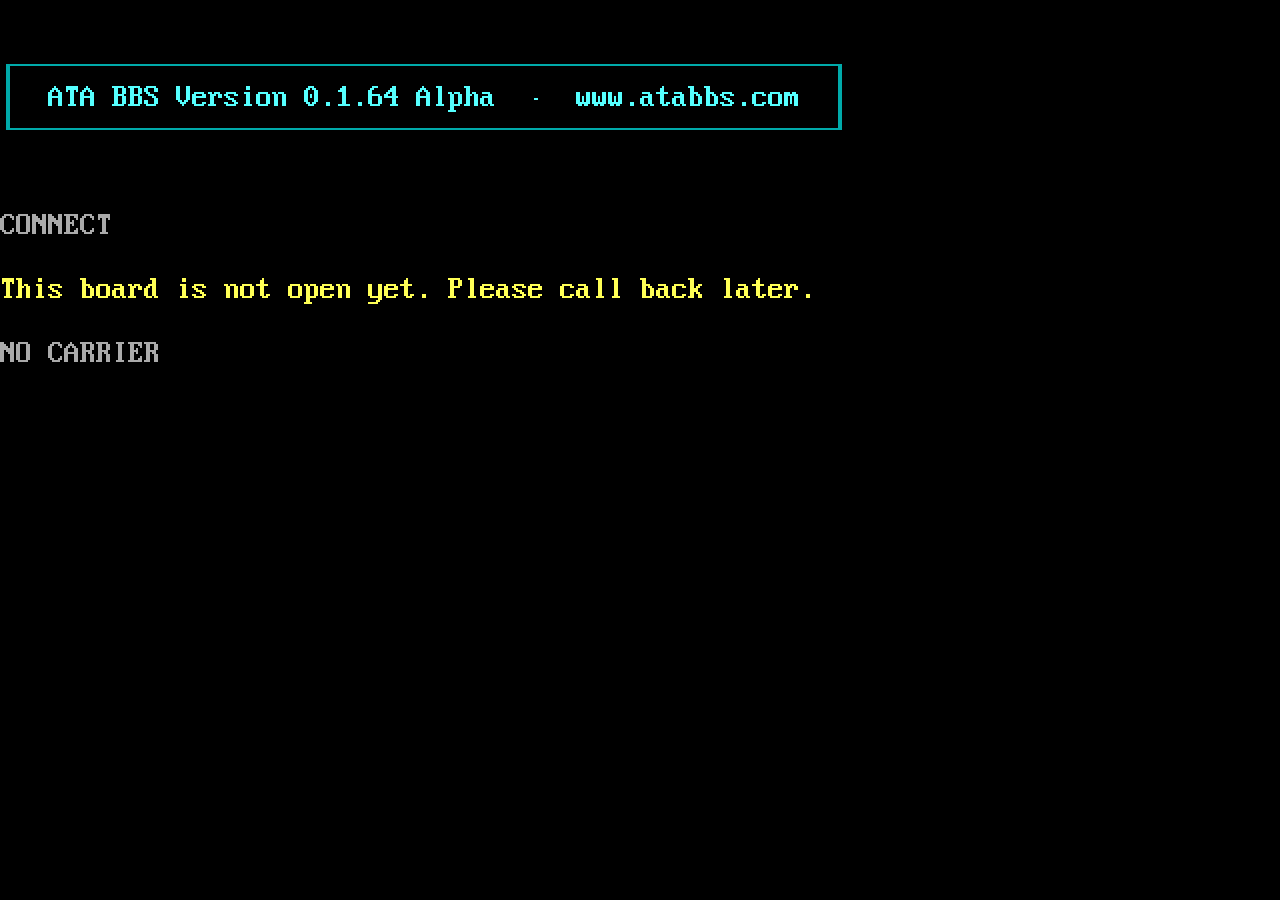
The front page. A caller opens your board's address (the folder ATA is in, such as https://your-site/bbs/). The page is a terminal and nothing else: no web login, no menus, no account. ATA's banner appears in a box, the page dials your board number, the line rings, and CONNECT 38400 hands the caller to your board's own first screen.
The first call downloads the machine (about 3.5 MB) and the parts of the board it needs, which can take a minute or two; the page says so ("First call from this browser..."). The browser keeps them, so every later call from that browser comes up at full speed. A board that holds its line in the ringing state for a while (a nightly duty running, a slow first boot) says what is happening on the line.
Logging on is the board's own business. The caller answers the board's own prompts: their handle, their password, whatever else your package asks. A new caller applies the way the package invites them (typing NEW at the name prompt, or answering yes to "new user?"), answers its questionnaire, and becomes a member when the package writes their record.
Typing goes straight to the board. Click the terminal first if the keyboard seems dead. Function keys, Alt and Ctrl combinations reach the board as on a real keyboard.
Paging the SysOp uses the board's own page or chat command. When you answer from the Watch page, the caller sees the board's own chat.
Files. Once the call connects, a small Files button appears at the top of the page, and the board's own transfer commands work as they did over a modem:
- Downloads start by themselves. When the board starts sending a file with Xmodem, Ymodem or Zmodem, the page answers it, shows a bar with the progress and a Stop button, and saves the file in the browser's downloads when it arrives.
- Uploads. Start an upload on the board as usual. When the board is ready, the bar says so: pick the file, check the name it will have on the board, choose the protocol if the board did not name one, and press Send. DOS file names are eight letters, a dot and three, in capitals; the page folds a long name to fit, and you can change it before sending (
My Vacation Photos.jpegbecomesMYVACATI.JPE). Put the long name in the board's description. - The Files button is there for a board whose wording the page does not recognise: it offers both directions by hand.
Xmodem (checksum and CRC), 1K-Xmodem, Ymodem batch and Zmodem are all spoken by the page itself, so whatever protocols your package offers that are in that family work without a separate program.
Hanging up. The board's own goodbye ends the call cleanly. Closing the tab is dropping carrier: the line is freed within a minute or two. Pressing Ctrl and ] three times in a row also hangs up.
What a caller may hear instead of the board:
- Your closed notice, then NO CARRIER, while the board is closed.
- BUSY, with a short reason under it: "all lines are in use"; "nightly event running, try again in a minute" while a duty has the board to itself; "the SysOp is working on the board" on The Major BBS while your DOS page runs it; or "try again later" when one address has failed too many logons in a row.
- NO ANSWER, when the board's machine does not come up within three minutes; the page redials a few times on its own before it gives up and suggests calling back in a minute. If callers hear this often, run the Host check.
- "This board could not take your application.", on The Major BBS, when new-user applications are closed or this address has used its three for the day: the package itself would have refused the record, so ATA says so politely and hangs up before the questions start.
- A plain sentence about the web server, such as "No reply from the web server" or "The web server turned away" a request, when the host is the trouble. Those sentences point the SysOp at the Host check.
Private details stay private. A board's user file holds every member's phone number, address and birth date. ATA hands each caller's machine only that caller's own details; every other member's private fields reach a caller's browser masked. Section 11 explains.
09More than one line
Each caller is on a node of their own: their own node number, their own drop files and work directories, and on most packages their own node record, exactly as the package's own multinode setup asks. All the lines share the user file, the messages, the file areas and the door games' worlds. Record locks keep two callers from writing the same record at once, as SHARE did on a 1993 network.
What a fresh install gives you: six lines on every package that can run six, set up and ready. A package whose own build stops lower runs its own maximum: RemoteAccess's shareware build, VBBS and Virtual Advanced (unregistered) stop at two, and GAP's build stops at three. Citadel-86e and Asgard-86 are single-line boards by design: one program serves the board from one compiled table.
Raising the cap: Settings, The line. The page offers up to your package's own maximum, and its hints say what a line past the sixth needs. On packages where ATA sets each new line up when it is first dialled (TriBBS, Searchlight, The Major BBS), that need nothing per line (Fido, Maximus, QuickBBS), or where every line comes set up already (RBBS-PC), every line up to the cap is ready. On the rest, lines past six need the package's own per-line setup, which ATA does not write yet.
Proven means measured: the Settings page says how many lines ATA has actually run at once on your package, with every line on its own node and LORD played on the last one. Six for most packages.
One caller, one line. A caller who opens a second tab and dials again takes a second line. The package decides whether the same account may be on twice; most refuse.
10Nightly duties and snapshots
A board needs regular housekeeping: door games want their daily maintenance and message bases want packing. In 1993 the board ran a batch at night when the line was quiet. ATA does the same.
Two duties: NIGHTLY, once a board day, and WEEKLY, once a board week. Each is a batch file on the board, ATA\NIGHTLY.BAT and ATA\WEEKLY.BAT, which you edit on the Events page. They start nearly empty: a line that writes "Nightly duties done" to the duty's log. You add what your board needs: the door guide shows Usurper's maintenance as an example.
When they run. At board midnight (on cron's tick, or the first request after it) each duty is armed. An armed duty runs on the first quiet machine:
- The first caller of the day, on a quiet board. Their line rings while the duty runs on their machine, within the caller-road time limit (default 4 minutes, up to 60), and then the call goes on as normal. Nobody else can call in during the run.
- Or you, from the console. Events, Run now in DOS. No time limit, and you watch it happen.
The snapshot. Before every run ATA copies the board's files aside. A run that ends without writing its completion file (a caller who closed the tab, a time limit reached, a program that hung) is an abort: the snapshot is restored, so the board is exactly as it was before the run. Two aborts in a row halt the duty's automatic runs until you fix the batch and press Reset on the Events page. ATA keeps a shelf of the recent snapshots under data/snapshots/ and prunes the oldest by itself.
Duties off. A board that does nothing overnight can tick "Do not run duties automatically": no caller is ever handed a maintenance run.
The batch rules. Write >> redirects on each line that should land in the log (DOS drops redirection on a batch's CALL line). Return to D:\ at the end. Programs that wait for a key at the console will hang a run on a caller's machine; test a new line with Run now first.
11How ATA keeps your board safe
Your board runs in strangers' browsers, so ATA treats every browser as untrusted and keeps the important rules on your host, where a browser cannot reach them.
Passwords never leave the host. A caller's machine never sees a real password, not even their own. When a caller types a password at the board's prompt, the page sends the typed line to the host, the host checks it against the user file itself (the relay), and the board on the caller's machine is handed a stand-in that matches its copy of the record. A wrong password stays wrong, and the board's own "wrong password" logic runs as written. A SysOp's second password (the system passwords of Renegade, T.A.G., Telegard, VBBS and Virtual Advanced) is checked the same way, and so is the new-user password VBBS and Virtual Advanced can ask of an applicant: each is masked in the copy of the configuration file a caller's machine reads.
Each caller sees only their own private details. Every member's phone numbers, street address and birth date are masked in the copy of the user file a caller's machine reads, and restored on the host if the board writes the mask back. The owner of a record and a SysOp seat see the real values. Logs and caller lists that carry typed passwords or private details are blind to callers.
The jail. Every write a caller's machine makes is checked against the package's rules before it touches your files:
- Configuration, menus, the door and protocol tables, and anything else that decides what a machine runs, are the SysOp's: a caller's machine may read them but never change them.
- The user file is written only record by record: a caller may change their own record, apply as a new member when applications are open, and nothing else. The level a new member gets is the one your package's own setup says, pinned on the host, so a tampered browser cannot apply as a SysOp.
- Before a caller has logged on, their machine may write almost nothing.
- No caller may create or change a program or overlay (
.COM,.EXE,.BAT,.OVR,.OVL,.DLL) except in the places the package itself writes programs during a call, so an upload can never become something the next caller's machine, or your console, runs. - Doors save their games in door folders (section 7.3): a door's data is a logged-on caller's to change there, its programs and the setup files you protect are yours.
- Each line's work directories and drop files belong to that line alone.
- A file a caller's machine leaves behind for the next caller to resume (a drop file, a current-caller record) lives in that caller's own browser tab, never on the host, so a dropped call can never hand the next caller someone else's session.
A refused write is logged at the security level with the path, and counted on the dashboard's Tripwires tile. A board doing ordinary things produces none; the packages' own routine refused writes are known and logged quietly as info.
The application desk (Settings) is the host's own gate on new members, and three applications per address per day is the ceiling even when it is open.
The upload allowance stops callers from filling your hosting account.
data/ must not be served to the web. ATA puts a deny rule there for Apache and checks live, through your web server, that it holds. On any other server, deny it yourself; the dashboard turns red if it is readable.
The console is protected by its own login, a per-session token on every form, and a lockout after repeated wrong passwords. Your DOS seat is trusted (it is the operator's machine room) and works on the board's files without the jail.
Who sees what: a caller's page shows the board, never ATA's internals; the log, the line list and the Watch page are console-only.
12Where things live
Inside your ATA folder:
| Path | What it is |
|---|---|
index.php |
The callers' page. |
api.php |
The road every caller's machine reads and writes the board through. |
admin/ |
The SysOp console. |
install.php |
The install wizard. Locked once the board is installed. |
cron.php |
The housekeeping tick. |
assets/, core/, lib/ |
ATA's own code. lib/ata/release.sha256 is the release's checksum list the Host check compares against; lib/ata/release.json says which release and board this install came from. |
profiles/ |
One file per package: ATA's knowledge of that exact package version. |
runtime/ |
The machine: the emulator, its BIOS, the FreeDOS boot floppy and ATA's DOS-side drivers. |
<package>/board/ |
The board's install source, the clean copy a fresh install is made from (for example renegade/board/). The live board is not here. |
data/ |
Everything that is yours. Never served to the web. |
Inside data/:
| Path | What it is |
|---|---|
data/doorstore/dos/board/ |
The live board. This folder is the machine's D: drive. Utilities you upload go here, and doors go in its DOORS folder (D:\DOORS), each in a folder of its own. |
data/ata.sqlite |
ATA's database: settings, the console login, the lines, the log, and the relay's records. |
data/config.php |
The install's configuration. Its presence locks the wizard. |
data/snapshots/ |
The snapshot shelf. |
data/logs/ |
ATA's own error log, when PHP has something to say. |
data/locks/ |
Lock files for the moments only one request may act. |
data/btrieve/ |
The Major BBS only: ATA's record manager's store. |
data/worlds/ |
The Major BBS only: each module world's shared state. |
data/ata-probe.txt |
The marker the privacy check fetches through your web server. |
Backups. Copy data/ while the board is quiet, and you have the whole board. A copy of data/ laid into a fresh install of the same ATA release and the same board brings it back.
13When something goes wrong
Callers hear the line ring and nothing answers. Run the Host check from a network your callers use. The two classic causes:
- Damaged machine files from an FTP upload in text mode. "Files on the server" fails and names them. Upload the setup file again (in binary mode) and run it: it repairs damaged files.
- A request limiter in front of PHP (mod_evasive, a "bot protection" feature, a hosting firewall). "Board requests" fails: a board makes a hundred requests in a few seconds and the limiter turns some away. Ask the host to exempt your board's folder, or
api.php.
Also check that the board is open, and that the dashboard shows no refusal.
The board says it is closed. Settings, Open to callers: tick the switch and save.
The AA lamp is red and callers are refused. Something in the package's own setup would put callers' private details where every caller can read them (PCBoard's Supported Allocations, for one). The dashboard's status line names it; change it back in the package's configuration and the board answers again.
Callers hear BUSY with nobody on. A line whose caller vanished is freed within a couple of minutes; cron makes that prompt. If the cap is 1, one forgotten tab holds the board.
The finish page or dashboard says the host serves data/. Deny web access to the data/ folder in your host's configuration (on nginx, a location block returning 403), then reload. Do not open the board until it says private.
A duty is halted. Two runs in a row were aborted. Open the Events page, read the last log, fix the batch (a program waiting for a key, a missing directory, a wrong path), run it once with Run now in DOS, and press Reset.
A caller's upload is refused with "disk full". The upload allowance is spent. Raise it on the Settings page, or tidy the board's file areas.
The dashboard shows security events. Read them: each names the path a caller's machine tried to write and why it was refused. One-off rows from a caller's experiments are harmless (the write never happened). Repeated rows on a path your board needs to write during ordinary calls mean the package is doing something its profile does not expect; report it with the log lines.
Something on the board misbehaves after you changed its configuration. The package's own configuration program is the road, run on the DOS page with the lines quiet. Several packages save only on a clean exit from their editor; a session ended by closing the tab loses the edits. Your board's chapter names the traps.
You lost the console password. Use the login page's "Lost it?" road (section 7.1): it gives you a code to save as ata-reset.txt in ATA's folder on your host, then lets you set a new console login. Nothing on the board changes.
A door loads but cannot save, or the log says "D:is not a door folder". The door is in a folder that is not a door folder. Move it into its own folder under D:\DOORS, or add its folder under Door folders on the Settings page (section 7.3).
A door in a door folder is refused one file. The file matches that folder's protected list. If the door writes it itself while it runs, take it off the list; if it is the door's setup, leave it protected and change it from the DOS page.
The setup page says the setup is running in another browser. The first browser to press Install owns the install. After fifteen idle minutes the page offers to take it over. An update is taken over by logging in.
An update refuses to run. The setup file is older than the ATA in place. Download the latest from www.atabbs.com.
A caller cannot type. They should click the terminal. A phone's on-screen keyboard is unreliable with a board; a desktop browser is the road.
A board answers slowly on the first call of the day. The first call downloads the machine and fills the browser's cache; later calls are fast. A door's first launch is slower for the same reason.
Reporting a problem. Run the Host check and copy its text block, add the dashboard log lines around the time (security and error levels), and say which board and which caller road (logon, upload, a door).
14The boards, one by one
Every board below is the package's own program, installed the way its own installer or manual lays it out, with only what ATA's machine needs changed. Each chapter says what ATA set up, which account you start with, what the DOS page buttons do, what your callers meet, and the package's quirks worth knowing.
A few things are true of every board and are not repeated in each chapter:
- The starting SysOp account is listed on the install wizard's finish page with its password. Change the password first thing.
- D: is the board drive,
data/doorstore/dos/boardin your ATA folder. - The DOS page buttons are the package's own programs; leave each one through its own exit so it saves.
- Paging reaches you on the Watch page, and the Answer, Break in and Leave buttons press the package's own keys listed in each chapter.
- File transfers in the Xmodem, Ymodem and Zmodem families are answered by the caller's page itself.
- Doors: the door guide has the full LORD setup for each board.
The boards are in alphabetical order.
Each board has a page of its own: its chapter, and the door guide's LORD setup for it.
| Board | Lines | Doors in the guide |
|---|---|---|
| Asgard-86 | One | LORD |
| Citadel-86e | One | LORD |
| Fido v12 | Six, up to 255 | None (the package has no door command) |
| GAP 6.6 | Three | LORD |
| The Major BBS 6.25 | Six, up to 256 | LORD, Galactic Empire, Legends of Kyrandia |
| Maximus 3.01 | Six, up to 255 | LORD |
| PCBoard 15.3 | Six, up to 100 | LORD |
| QuickBBS 2.849 | Six, up to 99 | LORD |
| RBBS-PC 17.4 | Six, up to 36 | LORD |
| RemoteAccess 2.62 | Two | LORD |
| Renegade 1.40 | Six, up to 255 | LORD |
| Searchlight BBS 5.1 | Six, up to 99 | LORD |
| Spitfire 3.7 | Six, up to 255 | LORD |
| T.A.G. 2.7d2 | Six, up to 255 | LORD |
| Telegard 3.09 | Six, up to 100 | LORD |
| TriBBS 11.6 | Six, up to 100 | LORD |
| VBBS 6.14a | Two | LORD |
| Virtual Advanced 2.10 | Two | LORD |
15Licenses and credits
ATA BBS is free software under the MIT license (LICENSE in your ATA folder). It is part of the BBS Preservation Project, with ATDT BBS, ATO Doors and Usurper.
The boards belong to their authors; ATA installs each one the way a SysOp would have and never changes a package's programs. Each is distributed under its own terms, with the credit line below:
| Board | Credit |
|---|---|
| Asgard-86 | Paul Gauthier, of Sacramento BBS fame |
| Citadel-86e | Farokh Irani, from the Citadel-86 line by Cynbe ru Taren |
| Fido v12 | Tom Jennings, Fido Software (public domain) |
| GAP 6.6 | GAP Development Company (GAP Communications) |
| The Major BBS 6.25 | Galacticomm, Inc. |
| Maximus 3.01 | Scott J. Dudley, Lanius Corporation (GPL) |
| PCBoard 15.3 | Clark Development Company |
| QuickBBS 2.849 | Pegasus Software (Rick Luquette); 2.849 Classic, Matrix Technologies |
| RBBS-PC 17.4 | The Capital PC User Group (Tom Mack and company) |
| RemoteAccess 2.62 | Bruce F. Morse, RemoteAccess Central (begun by Andrew Milner) |
| Renegade 1.40 | The Renegade Development Team (rgbbs.info) |
| Searchlight BBS 5.1 | Searchlight Software, Inc., with TeleGrafix Communications, Inc. |
| Spitfire 3.7 | Mike Woltz, Buffalo Creek Software |
| T.A.G. 2.7d2 | The T.A.G. Team |
| Telegard 3.09 | Tim Strike |
| TriBBS 11.6 | PTC Software |
| VBBS 6.14a | Virtual Advanced Communications |
| Virtual Advanced 2.10 | Roland De Graaf, Virtual ComTech |
The machine is built from free software, each part under its own license, recorded in runtime/LICENSES.txt:
- v86, the x86 emulator (BSD 2-Clause), with three ATA patches to its CPU.
- SeaBIOS (LGPLv3) and the Plex86/Bochs VGABios (LGPL).
- FreeDOS 1.2 kernel and FreeCOM shell (GPL v2), on a boot floppy from the FreeDOS Boot Disks project.
- The Crynwr NE2000 packet driver (GPL), EtherDFS (MIT), FreeDOS SHARE (GPL) and HimemX (public domain and GPL).
- ATA's own small DOS programs (its FOSSIL driver, its transfer driver ATAXFER, EDFSLOW, EDFSTRNC, the Btrieve requester, the ATALINK module for The Major BBS), under ATA's MIT license.
The type: the Web437 IBM VGA 8x16 font by VileR (CC BY-SA 4.0), for every terminal, and Archivo (SIL Open Font License) for the console.
Door games and modules are never part of ATA. Each belongs to its author and is installed by you under its own license; the door guide names them.
16Glossary
ATALINK. ATA's own add-on module for The Major BBS, loaded the package's documented way, which shares the Teleconference, who is online and paging across lines.
Board drive (D:). The folder data/doorstore/dos/board in your ATA folder, which every machine sees as its D: drive.
Console. The SysOp's web panel, admin/ in your ATA folder.
DOS page. The console page where your own machine runs the board's programs. Never called "DOS box" here, to avoid confusion with another emulator.
Door. A program a board runs for a caller, handing it the line and a drop file. Usually a game.
Drop file. The small text file a board writes for a door, naming the caller, their time left and the line (DOOR.SYS, DORINFO1.DEF, PCBOARD.SYS and others).
Duty. A batch of housekeeping that runs once a day (NIGHTLY) or once a week (WEEKLY) on a quiet machine.
FOSSIL. The standard DOS serial driver interface doors use to talk to the line. ATA's machine carries its own.
Jail. ATA's per-package rules for which files a caller's machine may change.
Line, node. One caller's connection, and the board's number for it. "Lines" and "nodes" mean the same thing here.
Line cap. How many callers may be on at once (Settings, The line).
Machine. The FreeDOS PC that runs in each caller's browser and on your DOS page.
Profile. ATA's knowledge of one exact package version: its files, records, rules and keys.
Relay. The host-side check of a typed password, so real passwords never reach a browser.
Snapshot. A copy of the board's files taken before a duty runs, restored if the run is cut off.
Stand-in. What a caller's machine is handed in place of a real password: it matches the board's copy of the record, so the board's own logon logic runs unchanged.
WFC. "Waiting for caller": a board's idle screen, with its sysop menus.
World. On The Major BBS, a game module's shared state, kept on your host so every line plays in the same game.
Door games have a guide of their own: the door guide. Questions go to the support forum.